Using FontAwesome Icons with Typst's Cheq

When using cheq, I wanted to replace the default icons with FontAwesome icons and discovered some important considerations.
Cheq's checklist provides a marker-map parameter, so the simplest approach is to directly pass FontAwesome icons to marker-map:
#import "@preview/cheq:0.3.0": checklist
#import "@preview/fontawesome:0.6.0": *

#set page(width: 6cm, height: auto, margin: .5em)

#grid(
  columns: (1fr,) * 2
)[
  #show: checklist

  - [ ] Alice
  - [x] Bob
  - [/] Charlie
][
  #show: checklist.with(
    marker-map: (
      "x": fa-square-check(fill: green.darken(20%)),
      " ": fa-square(fill: gray),
      "/": fa-square-minus(fill: yellow.darken(20%)),
    ),
  )

  - [ ] Alice
  - [x] Bob
  - [/] Charlie
]
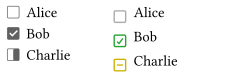
However, this approach doesn't produce ideal results. The FontAwesome icons appear too low compared to the text content on the right, while the default cheq icons on the left appear more centered:
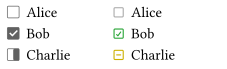
Therefore, it's necessary to adjust the position of FontAwesome icons to better align them with the text content. In typst-fontawesome, I allow the fa- function to directly accept text parameters, enabling the use of baseline and size to adjust the icon's position and size to match cheq's default icons:
#grid(
  columns: (1fr,) * 2
)[
  #show: checklist

  - [ ] Alice
  - [x] Bob
  - [/] Charlie
][
  #show: checklist.with(
    marker-map: (
      "x": fa-square-check(fill: green.darken(20%), baseline: -0.2em, size: .8em),
      " ": fa-square(fill: gray, baseline: -0.2em, size: .8em),
      "/": fa-square-minus(fill: yellow.darken(20%), baseline: -0.2em, size: .8em),
    ),
  )

  - [ ] Alice
  - [x] Bob
  - [/] Charlie
]
The adjusted result is shown below:
References
Translated by deepseek-chat